
DeskAvailable
Customer support tickets with SLA targets, portal replies, field escalations and CSAT.
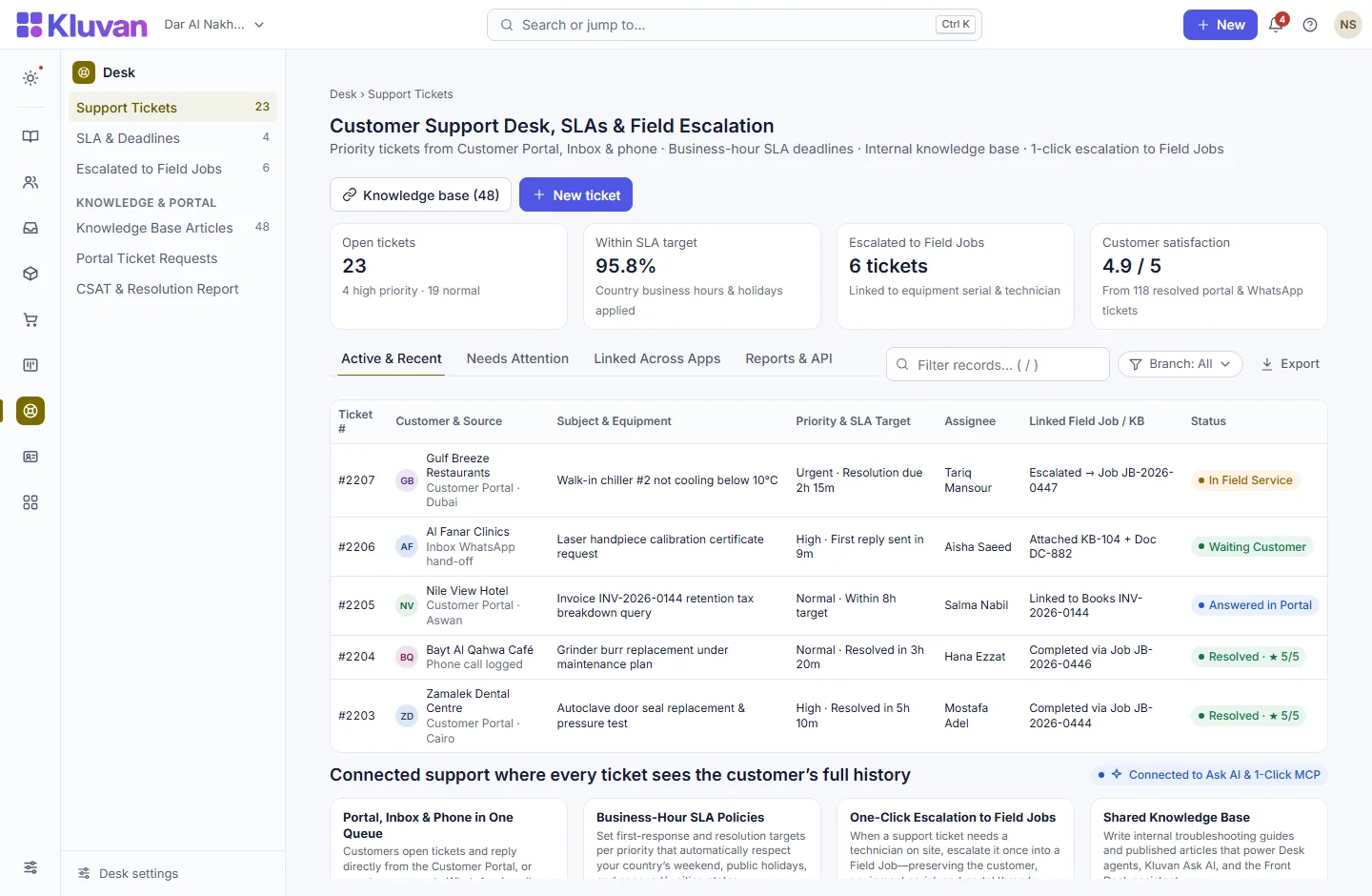
Deliver calm, accountable customer support. Log tickets from Inbox, the Customer Portal or staff, track first-response and resolution SLA timers inside your country’s business hours, keep internal team notes separate from customer replies, and escalate hardware or on-site issues into a Field Job in one click.

What it does
Full ticket lifecycle & internal notes: priority, assignee, linked customer, status workflow (Open → Pending → Resolved → Reopened), and private staff notes that customers never see
AvailableAutomated CSAT ratings: resolved tickets invite the customer to rate their experience and leave feedback, feeding team quality reports
AvailableResponse & resolution SLA targets: clear countdown timers on every ticket for first reply and full resolution
AvailableInternal & AI-cited knowledge base: write troubleshooting articles for agents that also power Kluvan Ask and Front Desk suggestions
AvailableOne-click escalation to Field Jobs: when a support ticket requires an on-site technician or equipment repair, escalate it once into a linked Field Job work order
AvailableTwo-way Customer Portal ticket centre: customers open new tickets, attach details, read replies and respond directly inside their Customer Portal
AvailableBusiness-hour SLA policies & breach alerts: configure targets per priority that pause outside working hours/weekends/holidays and alert managers before a breach
Available
A look inside
How it works end-to-end
From the first click or request to the linked record in your workspace.
1. Ticket arrives from Portal, Inbox or staff
A customer submits a support request in the Customer Portal or a WhatsApp/email thread in Inbox is converted into a ticket.
2. Business-hour SLA timer & routing start
Desk assigns the priority deadline based on your working hours and shows the customer’s full invoices, equipment and projects alongside the ticket.
3. Reply via Portal/Inbox or escalate to Field Job
Agents answer the customer, consult internal knowledge articles, or escalate the ticket in one click into an on-site Field Job.
4. Resolve & capture customer satisfaction
Once resolved, the customer receives a satisfaction check and the full history stays linked on their Customer 360 profile.
Connected Architecture, REST API / MCP & Keyboard Speed
Every Kluvan application shares one database, one audit trail, and instant AI & API extensibility.
Single Shared Record & Live Ledger
Shares the exact same customer, supplier, item, employee, and cost-centre record across all 28 apps with zero CSV syncing.
REST API, Webhooks & 1-Click MCP (.mcpb / SKILL.md)
Query live metrics from Claude Desktop, ChatGPT, Gemini, or Cursor using scoped read-only MCP keys and REST endpoints.
Keyboard-First Power (Ctrl+K & Alt+G Grid Mode)
Press Ctrl+K to jump anywhere in under 50ms, or press Alt+G on any table for arrow-key cell navigation, live Sum/Avg, and Ctrl+Shift+C Excel copy.
Built-In UAE, Egypt & IFRS Enterprise Moats
Native support for UAE 9% Corporate Tax & Small Business Relief (SBR), UAE EOSB Gratuity, WPS & Nafis, Egypt Law 6/2025 SME tax, InstaPay guard, Ejari cheques, IFRS 15/16, MRP, and bilingual Tafqeet.
Model Context Protocol (MCP) built in
Ask AI, Front Desk & 1-Click MCP in Desk
Agents can ask Kluvan Ask AI to summarize a customer’s past tickets and equipment history or draft a troubleshooting reply from published Documents SOPs using workspace AI credits.
Every workspace has one AI credit balance for Kluvan Ask, the AI invoice reader and Front Desk (the trial starts with 100 credits), plus 1-Click MCP for Claude, ChatGPT, Gemini and Cursor.
Claude Desktop & Claude.ai
Paste your single connector URL in Claude.ai Settings -> Integrations, or copy the ready-made JSON block into Claude Desktop.
ChatGPT Connectors
Connect your workspace URL in ChatGPT to query live sales, receivables, stock levels and project margins in any chat.
Google Gemini & AI Studio
Point Gemini or Google AI tooling to your Streamable HTTP MCP endpoint with Bearer key authentication.
Cursor, Windsurf & Custom Agents
Standard JSON-RPC 2.0 MCP 2025-06-18 protocol with full audit logs, per-minute rate limits and instant key pause/revoke.
Price
Kluvan charges in USD only. Your bank or card issuer may add exchange or card fees.
On its own
Per month, billed annually, with the first 3 full users of your organisation.
Included in
- Sales & Customer Care USD 49approx./ month
- Kluvan One USD 199approx./ month
Common questions answered
Can customers open and reply to tickets themselves?
Yes. Customers with the Requester role in the Customer Portal can open new support tickets, view status updates, and reply on the ticket thread.
Are internal agent notes visible to the customer in the portal?
Never. Desk strictly separates internal notes from customer-facing replies, and automated security tests verify that internal notes are never exposed in the portal.
What happens if a ticket needs a technician visit?
Clicking Escalate to Field Job creates a linked work order in Field Jobs carrying the customer, equipment, and problem description so nobody re-types anything.
Do SLA timers keep ticking over the weekend?
With SLA policies enabled, response deadlines respect your organisation’s business hours, country weekend (e.g. Fri–Sat or Sat–Sun), and public holidays.
Works with
Every WhatsApp, email, web chat, social DM and portal message in one AI-assisted team inbox.
Equipment register, estimates, conflict-free dispatch, mobile execution, van stock and job profitability.
One passwordless self-service portal for your customers and suppliers—in 7 languages, with zero per-user fees.
Try every app free for 14 days
Set up your company, invite your team and run a real week in Kluvan. No card needed.