
LearningAvailable
Turn your SOPs into mobile courses with quizzes, certificates, refresher rules and Field Job qualification checks.
Make sure every office, warehouse and field employee actually knows your procedures—and prove it during audits. Build courses from version-pinned Documents SOPs, add multiple-choice or numeric quizzes, let staff complete training on their phone (including low-cost Field and Self-Service seats), issue PDF certificates into Documents, and warn dispatchers before assigning an unqualified technician to a Field Job.

What it does
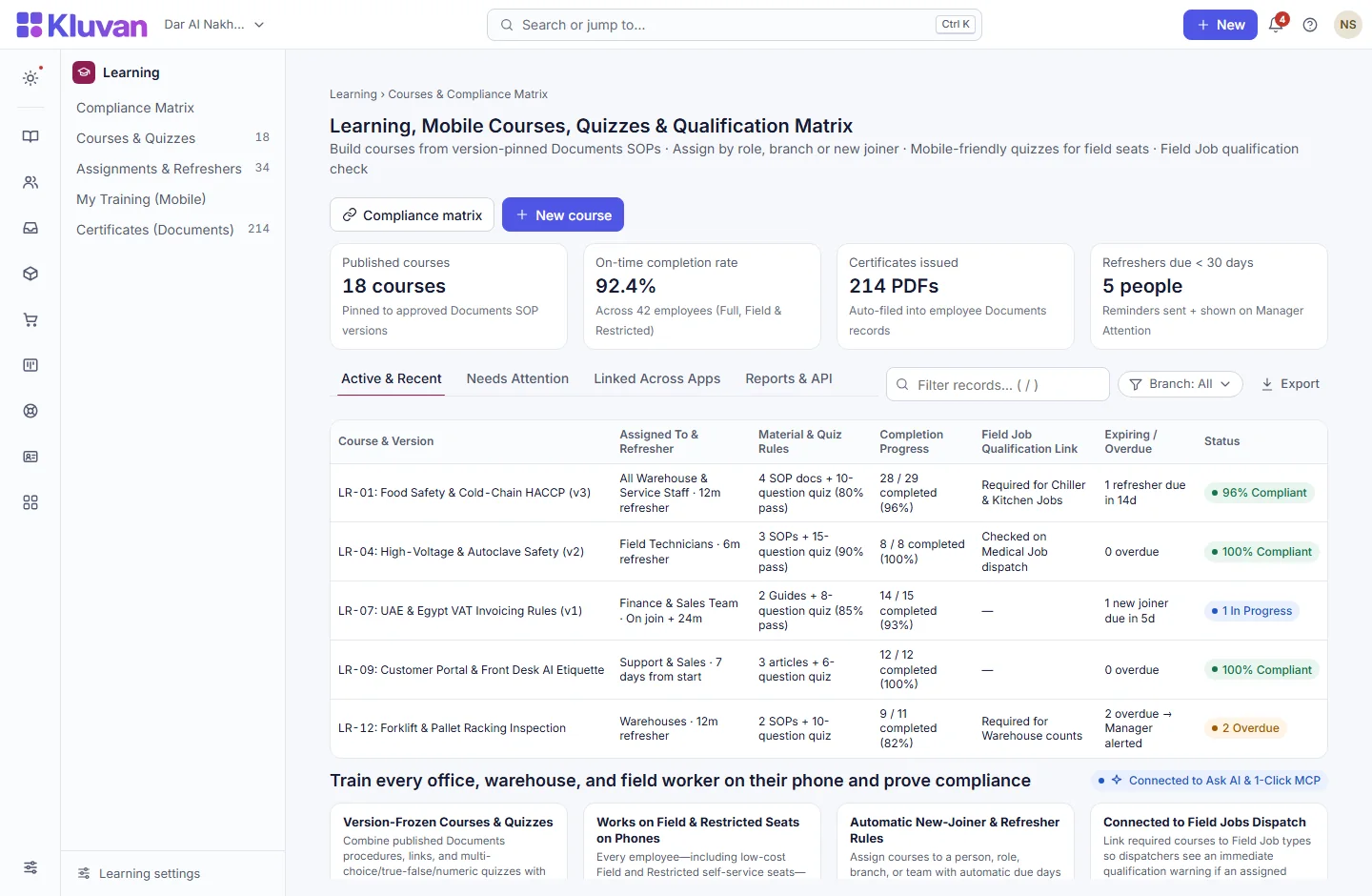
Version-frozen courses & quizzes: combine published Documents procedures, links and text with multiple-choice, true/false or numeric quizzes and a required pass mark
AvailableRole, branch & new-joiner auto-assignments: assign courses to individuals, roles, branches or everyone—automatically assigning onboarding courses to new hires from their start date
AvailableMobile learning for Field & Self-Service seats: staff take courses on their phone; quiz retries keep right answers and highlight only what needs another look
AvailableLive compliance matrix & Field Job qualification check: view people × courses by branch/state, and warn Field Jobs dispatchers if a technician lacks a required safety course
AvailableRecurring refreshers & expiry alerts: set 6-, 12- or 24-month refresher cycles with automatic reminders and escalation to the manager’s Attention List
AvailableImmutable completion records & PDF certificates: every pass generates a numbered PDF certificate (saved to Documents) that is never overwritten when a new course version comes out
AvailableOne-click “Everyone take v2”: publish an updated course version and require re-certification while preserving historical v1 records
Available
A look inside
How it works end-to-end
From the first click or request to the linked record in your workspace.
1. Build course from approved Documents SOPs
Pin published Documents procedures and add up to 30 quiz questions with a pass mark.
2. Assign by role, branch or new joiner
Set due days for new hires and recurring refresher intervals (e.g. every 12 months) for safety or compliance courses.
3. Staff complete quiz on their phone
Office, field and self-service employees read the material and pass the quiz on their phone, earning a PDF certificate.
4. Track matrix & verify Field Job dispatch
Managers monitor the branch Compliance Matrix while Field Jobs checks technician qualifications on dispatch.
Connected Architecture, REST API / MCP & Keyboard Speed
Every Kluvan application shares one database, one audit trail, and instant AI & API extensibility.
Single Shared Record & Live Ledger
Shares the exact same customer, supplier, item, employee, and cost-centre record across all 28 apps with zero CSV syncing.
REST API, Webhooks & 1-Click MCP (.mcpb / SKILL.md)
Query live metrics from Claude Desktop, ChatGPT, Gemini, or Cursor using scoped read-only MCP keys and REST endpoints.
Keyboard-First Power (Ctrl+K & Alt+G Grid Mode)
Press Ctrl+K to jump anywhere in under 50ms, or press Alt+G on any table for arrow-key cell navigation, live Sum/Avg, and Ctrl+Shift+C Excel copy.
Built-In UAE, Egypt & IFRS Enterprise Moats
Native support for UAE 9% Corporate Tax & Small Business Relief (SBR), UAE EOSB Gratuity, WPS & Nafis, Egypt Law 6/2025 SME tax, InstaPay guard, Ejari cheques, IFRS 15/16, MRP, and bilingual Tafqeet.
Model Context Protocol (MCP) built in
Ask AI, Front Desk & 1-Click MCP in Learning
Because courses link to published Documents SOPs, staff can both take structured quizzes in Learning and ask Kluvan Ask AI everyday procedural questions on the job.
Every workspace has one AI credit balance for Kluvan Ask, the AI invoice reader and Front Desk (the trial starts with 100 credits), plus 1-Click MCP for Claude, ChatGPT, Gemini and Cursor.
Claude Desktop & Claude.ai
Paste your single connector URL in Claude.ai Settings -> Integrations, or copy the ready-made JSON block into Claude Desktop.
ChatGPT Connectors
Connect your workspace URL in ChatGPT to query live sales, receivables, stock levels and project margins in any chat.
Google Gemini & AI Studio
Point Gemini or Google AI tooling to your Streamable HTTP MCP endpoint with Bearer key authentication.
Cursor, Windsurf & Custom Agents
Standard JSON-RPC 2.0 MCP 2025-06-18 protocol with full audit logs, per-minute rate limits and instant key pause/revoke.
Price
Kluvan charges in USD only. Your bank or card issuer may add exchange or card fees.
On its own
Per month, billed annually, with the first 3 full users of your organisation.
Included in
- Kluvan One USD 199approx./ month
Common questions answered
Do field technicians or self-service employees need a Full User seat to take training?
No. Field seats and Employee Self-Service seats can take assigned courses, complete quizzes, and download their certificates on their phone.
How does Learning connect to Field Jobs?
You can link required courses to specific Field Job types (such as high-voltage or cold-chain repair). If a dispatcher assigns someone whose course is missing or expired, Kluvan shows an immediate qualification warning.
Works with
Employee records, attendance, shifts, leave, self-service links and UAE/Egypt payroll in one system.
Encrypted company vault, four-eyes SOP publishing, 90/60/30/7-day expiry alerts and scoped share links.
Offline-ready mobile inspections, automatic Non-Conformances (NCR), four-eyes CAPA verification and supplier quality grades.
Try every app free for 14 days
Set up your company, invite your team and run a real week in Kluvan. No card needed.