
InboxAvailable
Every WhatsApp, email, web chat, social DM and portal message in one AI-assisted team inbox.
Stop sharing one phone around the office. Connect your Meta WhatsApp Business account, team email address, website live chat, Social pages and Customer Portal threads into one collaborative inbox—with the AI Front Desk answering routine questions inside your rules and handing complex chats to your team.
What it does
Official WhatsApp Cloud API: connect your organisation’s WhatsApp Business number with per-tenant encryption, HMAC webhook verification, and 24-hour window template guards
AvailableAI Front Desk with 4 operating modes: run in Off, Draft-Only (staff review every AI suggestion), Pilot, or Auto mode with deterministic gates for opt-out, business hours, and human hand-off
AvailableInstant human take-over & collision guard: pause the AI assistant in one click, collaborate with `@mentions` on internal notes, and return the thread when done
AvailableStructured team cases: turn complex conversations into tracked cases with a summary brief, assignee, due date and owner escalation reminders
AvailableSelf-improving knowledge pack: when a customer asks something the Front Desk doesn’t know, it holds and asks the owner once—then remembers the approved answer next time
AvailableVoice-note transcription & image understanding: automatically transcribes customer WhatsApp voice notes (Arabic & English) and interprets attached product/problem photos
AvailableShared team email channel: receive and reply to customer emails from your team address with full attachment and thread history
AvailableEmbeddable website live chat widget: add one script line (or toggle on Kluvan Sites) with visitor consent capture and rate limiting
AvailableQueues, round-robin routing & SLA response timers: route chats by keyword or contact owner, track first/next reply deadlines inside business hours, and alert before SLA breaches
AvailableOne-click convert to work: turn any conversation into a CRM Deal, Books Draft Quote, Desk Support Ticket, Field Job, or Collections task—linked both ways
Available
A look inside
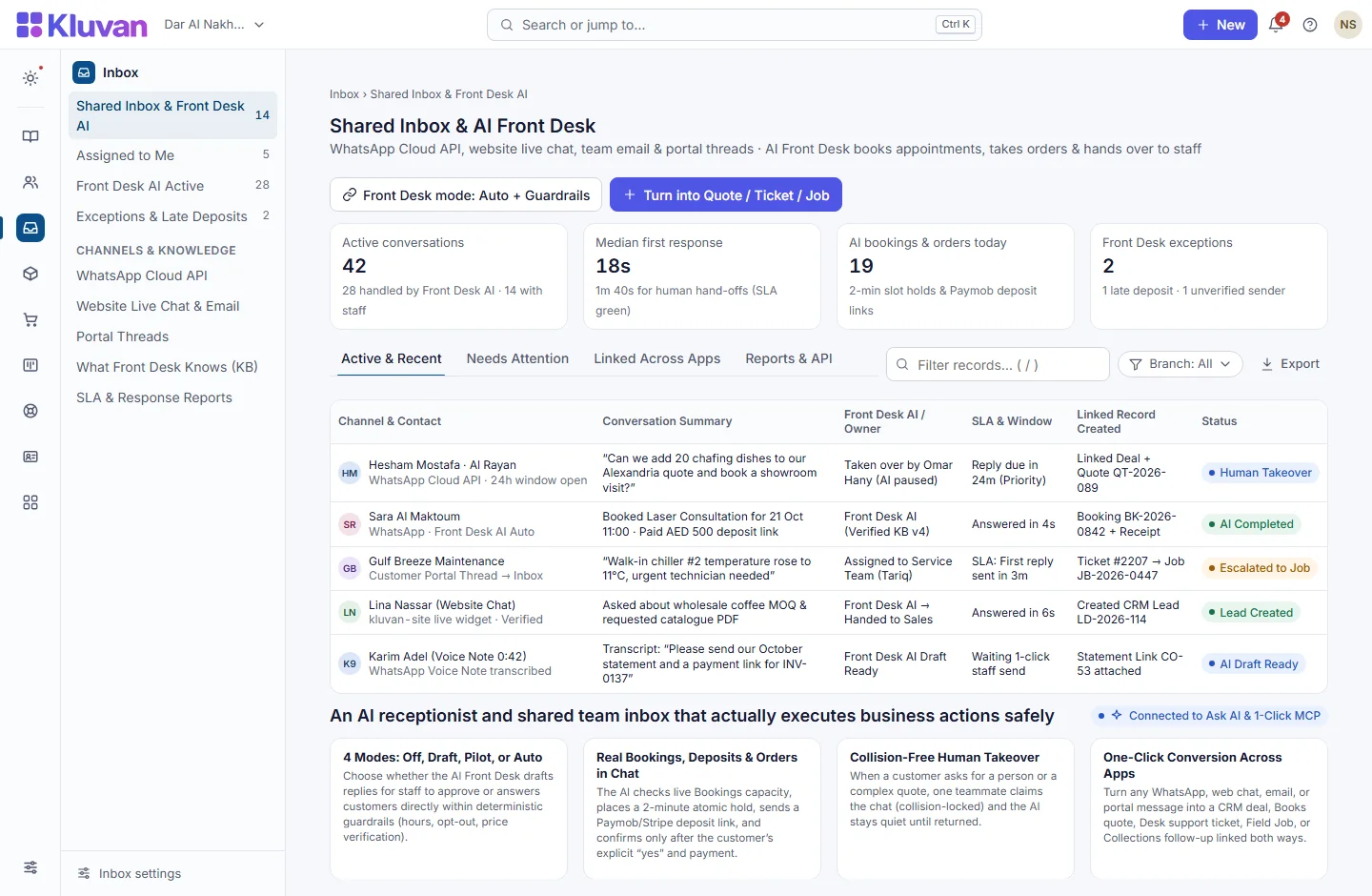
How it works end-to-end
From the first click or request to the linked record in your workspace.
1. Connect WhatsApp, email, web chat & social
Messages from WhatsApp, email, website chat, Facebook/Instagram DMs and Customer Portal threads arrive in one unified queue.
2. AI Front Desk drafts or replies safely
The AI Front Desk transcribes voice notes, cites your published Documents SOPs, and either drafts a reply for staff review or answers within your rules.
3. Route, collaborate & meet SLA timers
Keyword routing and round-robin assign chats to the right team, with internal `@mention` notes and business-hour SLA countdowns.
4. Convert chat into a quote, job or ticket
With one click, turn the conversation into a linked CRM deal, Books quote, Desk ticket or Field Job without copy-pasting.
Connected Architecture, REST API / MCP & Keyboard Speed
Every Kluvan application shares one database, one audit trail, and instant AI & API extensibility.
Single Shared Record & Live Ledger
Shares the exact same customer, supplier, item, employee, and cost-centre record across all 28 apps with zero CSV syncing.
REST API, Webhooks & 1-Click MCP (.mcpb / SKILL.md)
Query live metrics from Claude Desktop, ChatGPT, Gemini, or Cursor using scoped read-only MCP keys and REST endpoints.
Keyboard-First Power (Ctrl+K & Alt+G Grid Mode)
Press Ctrl+K to jump anywhere in under 50ms, or press Alt+G on any table for arrow-key cell navigation, live Sum/Avg, and Ctrl+Shift+C Excel copy.
Built-In UAE, Egypt & IFRS Enterprise Moats
Native support for UAE 9% Corporate Tax & Small Business Relief (SBR), UAE EOSB Gratuity, WPS & Nafis, Egypt Law 6/2025 SME tax, InstaPay guard, Ejari cheques, IFRS 15/16, MRP, and bilingual Tafqeet.
Model Context Protocol (MCP) built in
Ask AI, Front Desk & 1-Click MCP in Inbox
The AI Front Desk uses your workspace AI credits, the same balance as every other AI feature, to transcribe voice notes, draft replies from your approved knowledge pack, and check live stock or booking slots. A text conversation uses 15 credits for up to 8 replies within 24 hours; a live call uses 8 credits a minute.
Every workspace has one AI credit balance for Kluvan Ask, the AI invoice reader and Front Desk (the trial starts with 100 credits), plus 1-Click MCP for Claude, ChatGPT, Gemini and Cursor.
Claude Desktop & Claude.ai
Paste your single connector URL in Claude.ai Settings -> Integrations, or copy the ready-made JSON block into Claude Desktop.
ChatGPT Connectors
Connect your workspace URL in ChatGPT to query live sales, receivables, stock levels and project margins in any chat.
Google Gemini & AI Studio
Point Gemini or Google AI tooling to your Streamable HTTP MCP endpoint with Bearer key authentication.
Cursor, Windsurf & Custom Agents
Standard JSON-RPC 2.0 MCP 2025-06-18 protocol with full audit logs, per-minute rate limits and instant key pause/revoke.
Price
Kluvan charges in USD only. Your bank or card issuer may add exchange or card fees.
On its own
Not sold on its own: it comes with the plans listed here.
Included in
- Sales & Customer Care USD 49approx./ month
- Kluvan One USD 199approx./ month
Common questions answered
Can we review the AI’s replies before they are sent to customers?
Yes. In Draft mode, the AI Front Desk never sends a message to the customer—it writes a suggested draft inside the Inbox for your staff to edit, send, or discard.
What happens if a customer asks to speak to a human?
A deterministic gate detects any request for a person, opt-out word, or out-of-scope topic, immediately pauses the AI assistant, and alerts your team.
Does Inbox match incoming WhatsApp numbers to our existing CRM and Books customers?
Yes. Exact phone and email matches link to the Customer 360 record, while possible duplicate contacts are suggested for merge with a 30-day undo window.
Who pays for WhatsApp message fees?
You connect your own Meta WhatsApp Business account and pay Meta’s standard conversation rates directly; Kluvan adds zero markup per message.
Works with
Schedule multi-language posts with four-eyes approval and answer every comment and DM from Shared Inbox.
One Customer 360 record from first enquiry to pipeline deal, quote, and repeat campaign.
Customer support tickets with SLA targets, portal replies, field escalations and CSAT.
Try every app free for 14 days
Set up your company, invite your team and run a real week in Kluvan. No card needed.