
Understand what is on the shelf
Follow stock movements and purchasing records instead of relying on a sales total alone. Start with a small set of products and review one receipt.
Explore the workflow
Your connected AI workspace
Bring customers, accounts, projects and your team together. Let AI turn documents and notes into useful drafts and clear next steps, while you stay in control. Choose the apps that fit your work.
14 days of Kluvan One — every app — free. No card needed.

Halloween2026
Choose any of the three bundles or Kluvan One and pay 25 % less on monthly billing for your first 12 paid months. After that your plan renews at its regular monthly price.
Kluvan charges in USD only. Your bank or card issuer may add exchange or card fees.
| Plan | Offer, a month (first 12 paid months) | Regular, a month (from month 13) | Charged at checkout (USD, incl. 5 % VAT) |
|---|---|---|---|
| Sales & Customer Care | USD 44.10approx./ month | USD 58.80approx./ month | USD 46.31 then USD 61.74 |
| Service Business | USD 107.10approx./ month | USD 142.80approx./ month | USD 112.46 then USD 149.94 |
| Trade Business | USD 134.10approx./ month | USD 178.80approx./ month | USD 140.81 then USD 187.74 |
| Kluvan One | USD 179.10approx./ month | USD 238.80approx./ month | USD 188.06 then USD 250.74 |
Prices and checkout are in USD. Your bank or card issuer may add exchange or card fees.
Practical assistance inside your business tools, with review, permissions and clear usage limits.

A daily brief prioritizes verified action items. Available permissions and sources shape what you see; ordinary priorities remain when model usage is unavailable.

Read bill images and PDFs into supplier bill records. Review the account and tax treatment; optional automatic booking posts only bills that pass the checks.

Review suggested tasks before creating them. Switch between board, list, calendar, deadline timeline and workload views.
Ask in plain language or drop a file. Kluvan drafts the exact accounting, project or customer action — and waits for your approval.
Drop a photo or PDF of a multi-line supplier invoice into the invoice reader
Extracts supplier, tax number, line items, quantities and VAT treatment, checks 3-way match against your purchase order, and prepares the balanced journal entry.
Ask: Who owes us past 30 days, and what is our cash runway if collections slip two weeks?
Answers immediately from your live Books and Collections ledger with exact overdue invoices, customer payment history and 13-week cash impact.
Paste rough client call notes into Projects or Contracts
Generates structured project phases, task checklists, assignee workload estimates and billing milestones ready for your review.
A customer messages on WhatsApp asking about order status or booking availability
Front Desk checks live stock and schedule capacity, drafts or sends the reply in the customer language, and hands complex questions to your team.
Model Context Protocol (MCP) built in
Your workspace includes a built-in remote MCP server. Connect your favorite AI assistant in seconds with a scoped read-only key — no middleware or coding required.
Paste your single connector URL in Claude.ai Settings -> Integrations, or copy the ready-made JSON block into Claude Desktop.
Connect your workspace URL in ChatGPT to query live sales, receivables, stock levels and project margins in any chat.
Point Gemini or Google AI tooling to your Streamable HTTP MCP endpoint with Bearer key authentication.
Standard JSON-RPC 2.0 MCP 2025-06-18 protocol with full audit logs, per-minute rate limits and instant key pause/revoke.
Prepare your daily brief, turn a bill into a reviewed accounting record, draft tasks from notes and follow customer work through to invoicing. Connected apps share relevant records, so your team spends less time entering the same information.
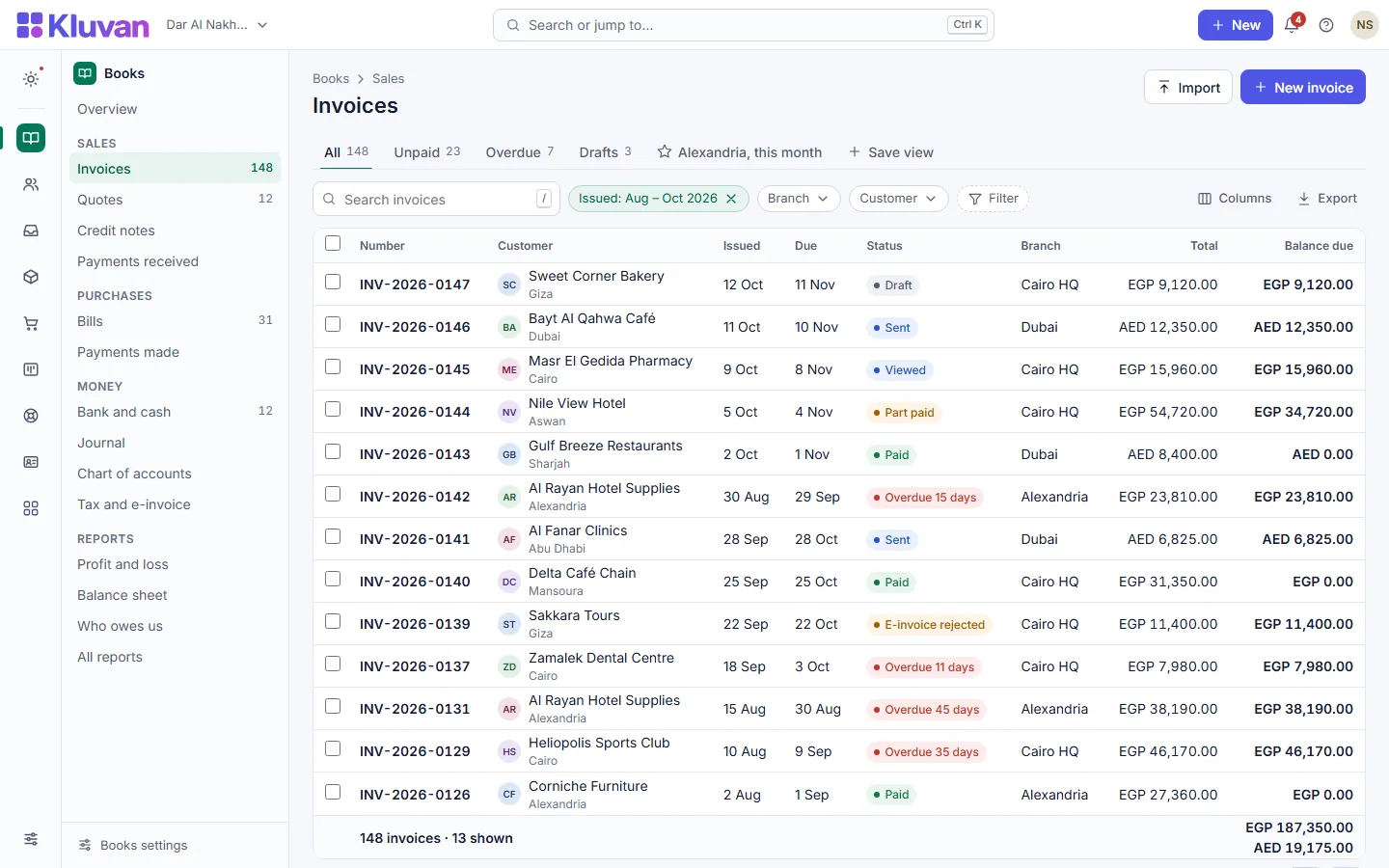
AI stays off until the owner enables it and agrees to provider data sharing. The trial includes 100 AI credits for the whole trial; the free HR Starter and Books Starter plans include 150 credits once; paid plans include AI credits every billing period plus a monthly AI allowance that grows with your subscription. Going past the allowance is off by default and needs a monthly cap you set, and nothing is recharged without your consent. Owners can opt out of model features or use their own supported Anthropic or OpenAI API key, which uses no Kluvan credits; the provider bills you directly.
Privacy policyMost businesses run the same loop every day. In Kluvan each step picks up where the last one stopped — no copying between tools.

A customer gets in touch. The enquiry becomes a deal on the customer's record, with an owner and a next step.

Send a quote from the deal. The customer accepts it by link; their name and the time are recorded.
The accepted quote becomes a project or a field job: tasks, time, materials and technicians in one place.
Invoice by milestone, progress or time and materials. The invoice keeps its link to the quote and the work.

Record the payment against its invoices and match it to your bank statement.
A deal keeps its quote. A project raises its invoices in Books. A ticket becomes a work order for the same customer. Your team stops asking “where is that?” and starts answering customers.

Bundles group the apps that belong together and include seats for your field staff and employees. Or buy apps one at a time.
Kluvan charges in USD only. Your bank or card issuer may add exchange or card fees.

For teams that sell and support
per month, billed annually
Halloween2026 25 % off the regular monthly price
USD 44.10approx./ month Regular price USD 58.80approx.
For the first 12 paid months, then USD 58.80approx. a month. Before VAT.
Charged in USD: USD 44.10 + 5 % VAT USD 2.21 = USD 46.31 a month for the first 12 paid months, then USD 58.80 + USD 2.94 VAT = USD 61.74 a month.
Prices and checkout are in USD. Your bank or card issuer may add exchange or card fees.
Annual billing is excluded from this offer and keeps its regular annual price.
300 AI credits each billing period, plus a monthly AI allowance that grows with your subscription, in one balance for every AI feature. AI is optional; top-ups and your own API key are supported.
Start free trial
For businesses that deliver jobs and projects
per month, billed annually
Halloween2026 25 % off the regular monthly price
USD 107.10approx./ month Regular price USD 142.80approx.
For the first 12 paid months, then USD 142.80approx. a month. Before VAT.
Charged in USD: USD 107.10 + 5 % VAT USD 5.36 = USD 112.46 a month for the first 12 paid months, then USD 142.80 + USD 7.14 VAT = USD 149.94 a month.
Prices and checkout are in USD. Your bank or card issuer may add exchange or card fees.
Annual billing is excluded from this offer and keeps its regular annual price.
300 AI credits each billing period, plus a monthly AI allowance that grows with your subscription, in one balance for every AI feature. AI is optional; top-ups and your own API key are supported.
Start free trial
For distributors and wholesalers
per month, billed annually
Halloween2026 25 % off the regular monthly price
USD 134.10approx./ month Regular price USD 178.80approx.
For the first 12 paid months, then USD 178.80approx. a month. Before VAT.
Charged in USD: USD 134.10 + 5 % VAT USD 6.71 = USD 140.81 a month for the first 12 paid months, then USD 178.80 + USD 8.94 VAT = USD 187.74 a month.
Prices and checkout are in USD. Your bank or card issuer may add exchange or card fees.
Annual billing is excluded from this offer and keeps its regular annual price.
300 AI credits each billing period, plus a monthly AI allowance that grows with your subscription, in one balance for every AI feature. AI is optional; top-ups and your own API key are supported.
Start free trial
Every app, one plan
per month, billed annually
Halloween2026 25 % off the regular monthly price
USD 179.10approx./ month Regular price USD 238.80approx.
For the first 12 paid months, then USD 238.80approx. a month. Before VAT.
Charged in USD: USD 179.10 + 5 % VAT USD 8.96 = USD 188.06 a month for the first 12 paid months, then USD 238.80 + USD 11.94 VAT = USD 250.74 a month.
Prices and checkout are in USD. Your bank or card issuer may add exchange or card fees.
Annual billing is excluded from this offer and keeps its regular annual price.
Every app, including the ones coming soon
Apps1,000 AI credits each billing period, plus a monthly AI allowance that grows with your subscription, in one balance for every AI feature. AI is optional; top-ups and your own API key are supported.
Start free trialApps marked coming soon join your plan at no extra cost when they are released.
Each app raises its own alerts — a project running late, a document about to expire, a purchase waiting for approval — in the app, by e-mail or on Telegram, with quiet hours.
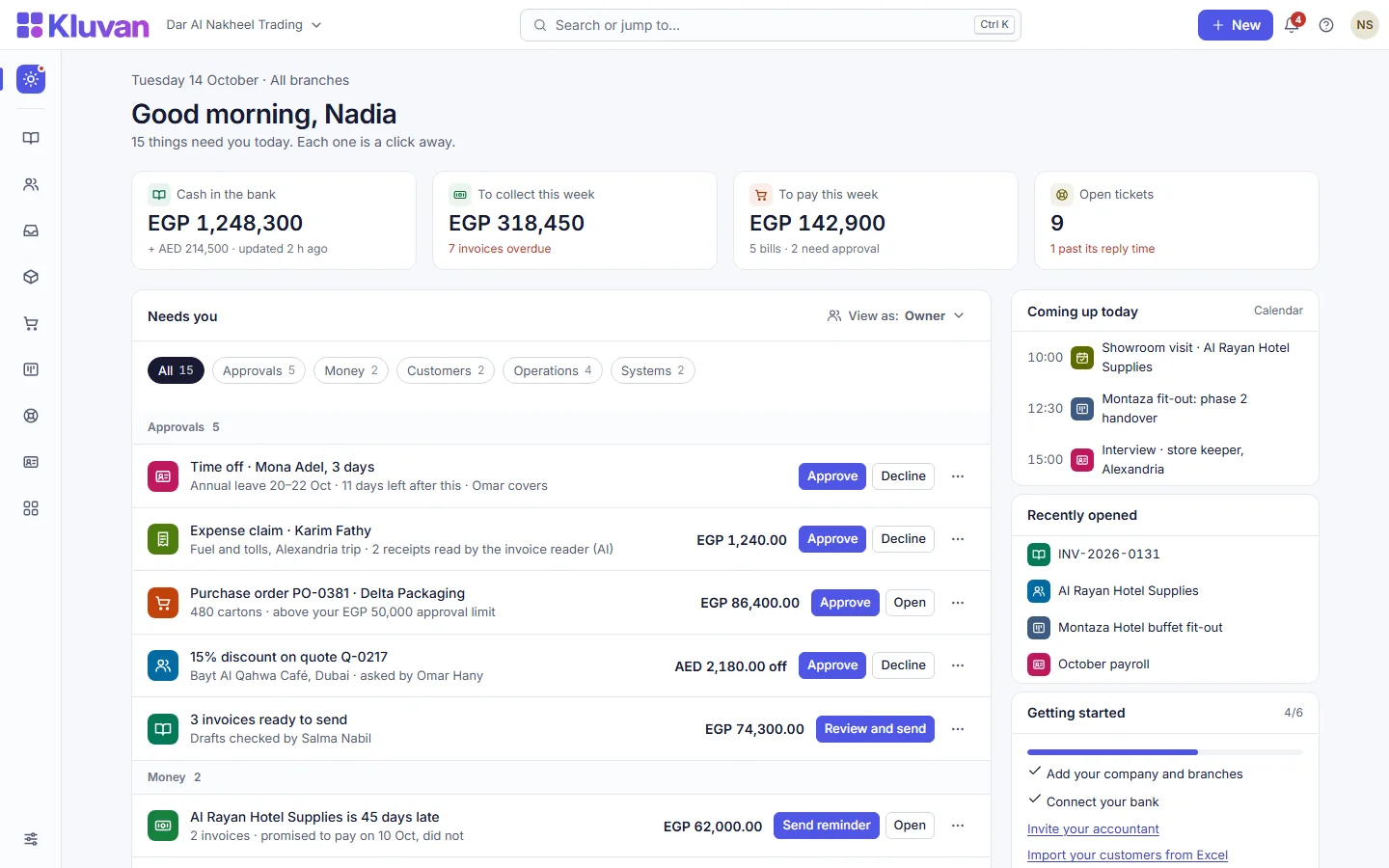

Each person chooses their own interface language. Documents can go out in English or Arabic. Prices, VAT and holidays follow your country's pack.


Encrypted connections, encrypted files, rights per person and an activity log.
Security and data
Bring customers, suppliers, products and opening balances from Excel — with a preview, checks and undo.
Migration packages
Ask us anything on WhatsApp. Chat first; no phone trees, no waiting for a call back.
Contact usAdd a customer, create a quote and prepare an invoice during your free trial.
A customer gets in touch. The enquiry becomes a deal on the customer's record, with an owner and a next step.
Send a quote from the deal. The customer accepts it by link; their name and the time are recorded.
Invoice by milestone, progress or time and materials. The invoice keeps its link to the quote and the work.
The apps use the same Kluvan account, organisation, records and rights as the web. Or simply keep working in your browser.
Sign in with your Kluvan account, or create one. Take a photo of a receipt or a document and attach it. The app needs an internet connection.

Needs an internet connection and a Kluvan account. It is the Online edition, not an offline accounting application.

Download it from our website. Tested on Ubuntu 24.04; an internet connection and a Kluvan account are needed.
The apps are free to download. Every new organisation gets a free 14-day trial of Kluvan One; to keep using Kluvan after it, choose a paid plan on our website. No in-app purchases, no ads. See plans and prices
Set up your company, invite your team and run a real week in Kluvan. No card needed.
Go beyond an empty dashboard. Choose one real task, see how the records connect and try it with your team. Availability depends on your apps and plan.
Follow stock movements and purchasing records instead of relying on a sales total alone. Start with a small set of products and review one receipt.
Explore the workflow
Give an enquiry an owner, record the next action and keep the quotation connected to the customer story.
Explore the workflow
Compare the purchase order, the delivery and the invoice. Review exceptions before they become an accounting surprise.
Explore the workflowOptional Books posting controls can require another reviewer above a configured threshold. Approval and final posting are separate steps.
Explore the workflowPlan tasks and record time and materials, then follow the work into billing using the enabled project and accounting apps.
Explore the workflowLinked customer and operational records help the next person understand what happened. Check the supported links in your chosen apps.
Explore the workflow