
Field jobsAvailable
Equipment register, estimates, conflict-free dispatch, mobile execution, van stock and job profitability.
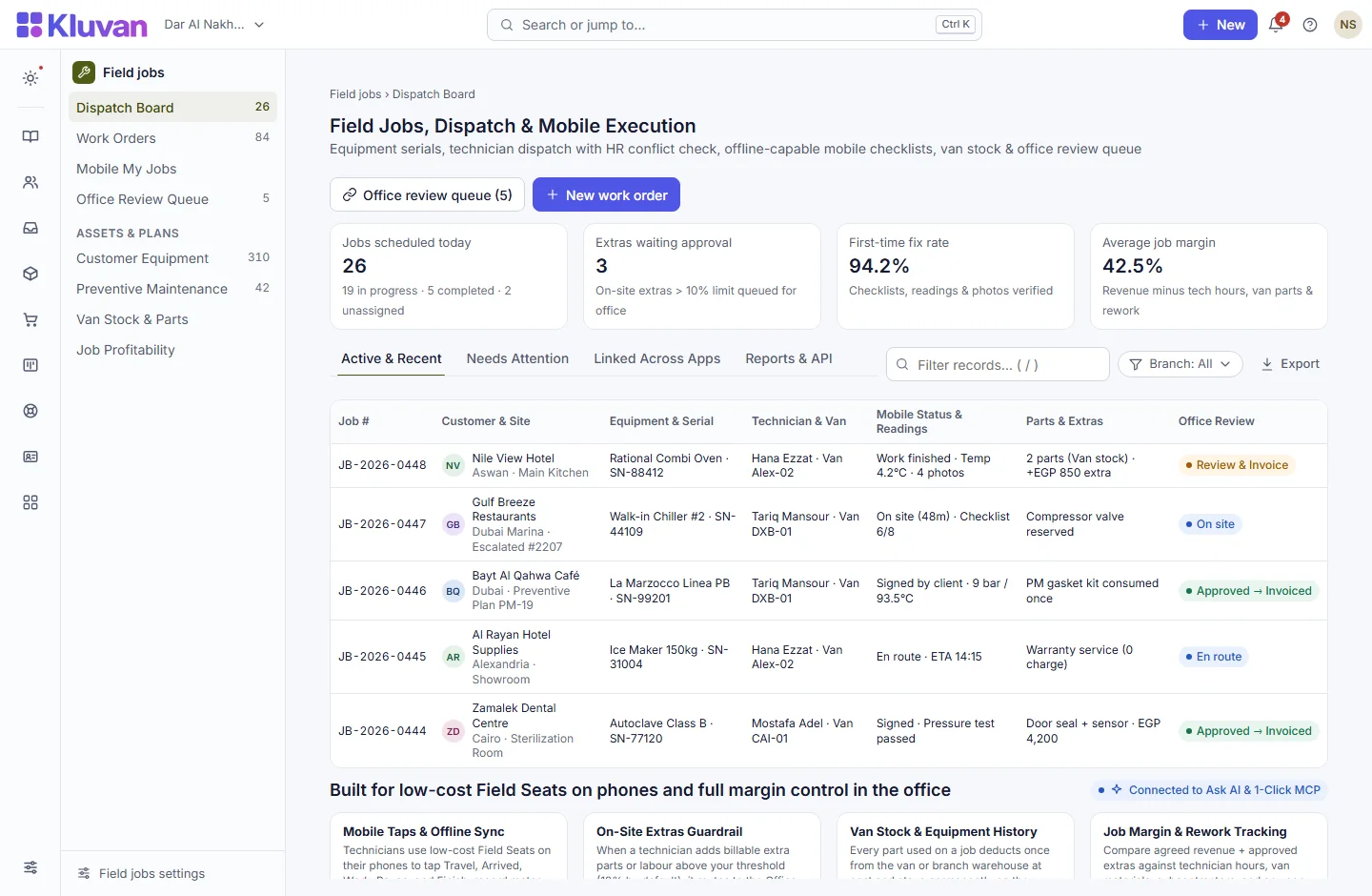
Built for maintenance contractors, installers and field service teams. Track every customer’s serialized equipment and warranty, send estimates customers approve in the portal, dispatch technicians on a visual day/week board with HR availability and qualification checks, execute checklists offline on phones, and review job margin before invoicing in Books.

What it does
Customer equipment & warranty register: track model, serial number, installation site, warranty expiry and complete service history per unit
AvailableItemised service estimates with VAT: quote labour, spare parts, call-out fees and services with country VAT calculation
AvailableOnline estimate approval in Customer Portal: customers review and approve quoted estimates online before you dispatch a van
AvailableConflict-free technician dispatch & Learning checks: check technician calendar clashes, HR leave, and required Learning safety certificates before assigning
AvailableSingle-deduction van & branch parts: spare parts used on a job deduct from the technician’s van or branch warehouse once upon job approval, at actual cost
AvailablePreventive maintenance (AMC) schedules: recurring maintenance plans automatically generate the next scheduled service visit
AvailableOne-click Books invoice, receipt & credit note: turn an approved job (fixed price, time & materials, contract or warranty) straight into a Books tax invoice
AvailableMobile & offline technician app: technicians use low-cost Field seats on their phone to view today’s jobs, fill required readings/photos (`#`, `@`, `*`), log time, and capture customer sign-off
AvailableOn-site extras & approval thresholds: technicians log extra parts or labour found on site; extras above your Studio percentage/amount limit require office approval
AvailableLive job profitability report: compare agreed revenue against technician labour hours, van parts at cost, and subcontractor expenses—sorted worst-margin first
AvailableDay & week visual dispatch board: see every technician’s schedule, unassigned approved orders, and late jobs at a glance
AvailableOffice review queue before invoicing: review completed phone jobs, approve or reject on-site extras, verify margin, and release to invoicing
Available
A look inside
How it works end-to-end
From the first click or request to the linked record in your workspace.
1. Estimate or preventive maintenance trigger
Open a work order from a Desk ticket, an AMC maintenance schedule, or an estimate approved by the client in the Customer Portal.
2. Dispatch with HR & qualification checks
Assign a technician or crew on the Dispatch Board; Kluvan checks Bookings clashes, HR leave, and required Learning courses.
3. Technician executes on phone (offline-ready)
On a low-cost Field seat, the technician completes required checklist readings and photos, records van parts and extras, and captures sign-off.
4. Office review, stock deduction & Books invoice
The office approves the completed job in the Review Queue—deducting van stock once, calculating exact job margin, and issuing the Books invoice.
Connected Architecture, REST API / MCP & Keyboard Speed
Every Kluvan application shares one database, one audit trail, and instant AI & API extensibility.
Single Shared Record & Live Ledger
Shares the exact same customer, supplier, item, employee, and cost-centre record across all 28 apps with zero CSV syncing.
REST API, Webhooks & 1-Click MCP (.mcpb / SKILL.md)
Query live metrics from Claude Desktop, ChatGPT, Gemini, or Cursor using scoped read-only MCP keys and REST endpoints.
Keyboard-First Power (Ctrl+K & Alt+G Grid Mode)
Press Ctrl+K to jump anywhere in under 50ms, or press Alt+G on any table for arrow-key cell navigation, live Sum/Avg, and Ctrl+Shift+C Excel copy.
Built-In UAE, Egypt & IFRS Enterprise Moats
Native support for UAE 9% Corporate Tax & Small Business Relief (SBR), UAE EOSB Gratuity, WPS & Nafis, Egypt Law 6/2025 SME tax, InstaPay guard, Ejari cheques, IFRS 15/16, MRP, and bilingual Tafqeet.
Model Context Protocol (MCP) built in
Ask AI, Front Desk & 1-Click MCP in Field jobs
Use Kluvan Ask AI or 1-Click MCP in Claude/ChatGPT to ask: “Which field jobs completed this week had a gross margin below 20%, and which technicians have unassigned capacity tomorrow?”
Every workspace has one AI credit balance for Kluvan Ask, the AI invoice reader and Front Desk (the trial starts with 100 credits), plus 1-Click MCP for Claude, ChatGPT, Gemini and Cursor.
Claude Desktop & Claude.ai
Paste your single connector URL in Claude.ai Settings -> Integrations, or copy the ready-made JSON block into Claude Desktop.
ChatGPT Connectors
Connect your workspace URL in ChatGPT to query live sales, receivables, stock levels and project margins in any chat.
Google Gemini & AI Studio
Point Gemini or Google AI tooling to your Streamable HTTP MCP endpoint with Bearer key authentication.
Cursor, Windsurf & Custom Agents
Standard JSON-RPC 2.0 MCP 2025-06-18 protocol with full audit logs, per-minute rate limits and instant key pause/revoke.
Price
Kluvan charges in USD only. Your bank or card issuer may add exchange or card fees.
On its own
Per month, billed annually, with the first 3 full users of your organisation.
Included in
- Service Business USD 119approx./ month
- Kluvan One USD 199approx./ month
Common questions answered
Do our field technicians need expensive full user licences?
No. Field Jobs is designed for low-cost Field User seats. By default, field seats see only their assigned jobs and never see company costs or margins.
Can a technician invoice a customer before the office checks their work?
No. Any job completed on a phone lands in the Office Review Queue first. It cannot be invoiced until the office approves the job and decides on any on-site extras.
What if the technician works in a basement with no mobile signal?
Mobile checklists, readings, notes, and photos work offline on the phone and sync once when the connection returns.
How do spare parts on a van get tracked?
Each service van can be set up as a location in Warehouses. When the office approves a completed job, consumed parts deduct from that van or branch stock once at cost.
Works with
Customer support tickets with SLA targets, portal replies, field escalations and CSAT.
Multi-branch stock, FEFO lots and expiry, serial numbers, blind cycle counts and BOM production.
Plan phases and budgets, lock weekly timesheets, track stock/expense costs and bill milestones in Books.
Try every app free for 14 days
Set up your company, invite your team and run a real week in Kluvan. No card needed.