
डेस्कउपलब्ध
सपोर्ट टिकट जो खुश ग्राहक पर खत्म हों।
हर अनुरोध को टिकट के रूप में दर्ज करें, आंतरिक नोट्स जवाबों से अलग रखें, विज़िट की ज़रूरत हो तो काम तकनीशियन को भेजें, और ग्राहक से पूछें कि कैसा रहा।
यह क्या करता है
प्राथमिकता, ज़िम्मेदार, आंतरिक नोट्स, समाधान और दोबारा खोलने के साथ टिकट
उपलब्धहर हल किए गए टिकट पर संतुष्टि रेटिंग
उपलब्धहर टिकट पर जवाब और समाधान के लक्ष्य
उपलब्धआंतरिक नॉलेज लेख
उपलब्धटिकट को फ़ील्ड वर्क ऑर्डर तक बढ़ाएँ
उपलब्धग्राहक पोर्टल में अपने टिकट देखते और जवाब देते हैं
उपलब्धकार्य-घंटों और उल्लंघन अलर्ट के साथ सर्विस-लेवल नीतियाँ
उपलब्ध
अंदर की एक झलक
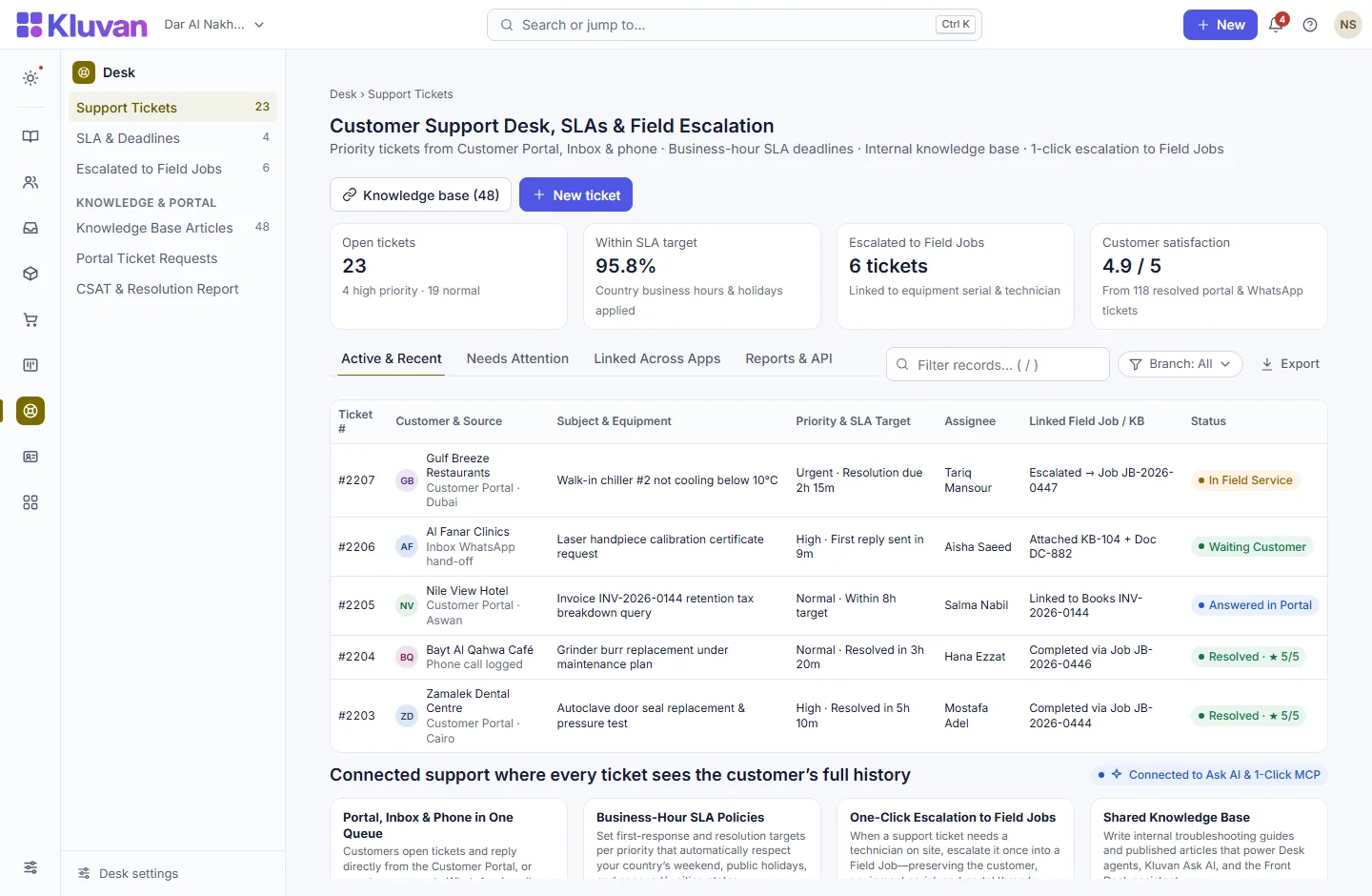
शुरू से आख़िर तक यह कैसे काम करता है
पहले क्लिक या अनुरोध से लेकर आपके वर्कस्पेस में जुड़े रिकॉर्ड तक।
1. Ticket arrives from Portal, Inbox or staff
A customer submits a support request in the Customer Portal or a WhatsApp/email thread in Inbox is converted into a ticket.
2. Business-hour SLA timer & routing start
Desk assigns the priority deadline based on your working hours and shows the customer’s full invoices, equipment and projects alongside the ticket.
3. Reply via Portal/Inbox or escalate to Field Job
Agents answer the customer, consult internal knowledge articles, or escalate the ticket in one click into an on-site Field Job.
4. Resolve & capture customer satisfaction
Once resolved, the customer receives a satisfaction check and the full history stays linked on their Customer 360 profile.
Connected Architecture, REST API / MCP & Keyboard Speed
हर Kluvan ऐप एक ही डेटाबेस, एक ही ऑडिट ट्रेल और तुरंत AI व API विस्तार साझा करता है।
Single Shared Record & Live Ledger
ग्राहक, सप्लायर, आइटम, कर्मचारी और कॉस्ट-सेंटर का एक ही रिकॉर्ड सभी 28 ऐप्स में साझा होता है, बिना किसी CSV सिंकिंग के।
REST API, Webhooks & 1-Click MCP (.mcpb / SKILL.md)
सीमित दायरे वाली रीड-ओनली MCP कुंजियों और REST एंडपॉइंट्स से Claude Desktop, ChatGPT, Gemini या Cursor में लाइव आँकड़े पूछें।
Keyboard-First Power (Ctrl+K & Alt+G Grid Mode)
50ms से कम में कहीं भी पहुँचने के लिए Ctrl+K दबाएँ, या किसी भी टेबल पर Alt+G दबाकर ऐरो-की से सेल नेविगेशन, लाइव Sum/Avg और Ctrl+Shift+C से Excel कॉपी पाएँ।
Built-In UAE, Egypt & IFRS Enterprise Moats
UAE 9% Corporate Tax और Small Business Relief (SBR), UAE EOSB ग्रेच्युटी, WPS और Nafis, मिस्र का कानून 6/2025 SME टैक्स, InstaPay गार्ड, Ejari चेक, IFRS 15/16, MRP और द्विभाषी Tafqeet (रकम शब्दों में) का नेटिव सपोर्ट।
Model Context Protocol (MCP) built in
Ask AI, Front Desk & 1-Click MCP in डेस्क
एजेंट वर्कस्पेस AI क्रेडिट से Kluvan Ask AI को किसी ग्राहक के पुराने टिकट और उपकरण इतिहास का सार बनाने, या प्रकाशित Documents SOPs से समस्या-समाधान जवाब ड्राफ़्ट करने को कह सकते हैं।
हर वर्कस्पेस में Kluvan Ask, AI इनवॉइस रीडर और Front Desk के लिए एक ही AI क्रेडिट बैलेंस होता है (ट्रायल 100 क्रेडिट से शुरू होता है), साथ में Claude, ChatGPT, Gemini और Cursor के लिए 1-Click MCP।
Claude Desktop & Claude.ai
अपना एक कनेक्टर URL Claude.ai Settings -> Integrations में पेस्ट करें, या तैयार JSON ब्लॉक Claude Desktop में कॉपी करें।
ChatGPT Connectors
ChatGPT में अपना वर्कस्पेस URL जोड़ें और किसी भी चैट में लाइव बिक्री, प्राप्तियाँ, स्टॉक स्तर और प्रोजेक्ट मार्जिन पूछें।
Google Gemini & AI Studio
Gemini या Google AI टूल्स को Bearer कुंजी प्रमाणीकरण के साथ अपने Streamable HTTP MCP एंडपॉइंट से जोड़ें।
Cursor, Windsurf & Custom Agents
मानक JSON-RPC 2.0 MCP 2025-06-18 प्रोटोकॉल, पूरे ऑडिट लॉग, प्रति-मिनट रेट लिमिट और कुंजी को तुरंत रोकने/रद्द करने की सुविधा के साथ।
कीमत
Kluvan केवल USD में शुल्क लेता है। आपका बैंक या कार्ड जारीकर्ता विनिमय या कार्ड शुल्क जोड़ सकता है।
अकेले
प्रति माह, सालाना भुगतान, आपके संगठन के पहले 3 फ़ुल यूज़र सहित।
इनमें शामिल
- सेल्स और कस्टमर केयर USD 49लगभग/ माह
- Kluvan One USD 199लगभग/ माह
आम सवालों के जवाब
Can customers open and reply to tickets themselves?
Yes. Customers with the Requester role in the Customer Portal can open new support tickets, view status updates, and reply on the ticket thread.
Are internal agent notes visible to the customer in the portal?
Never. Desk strictly separates internal notes from customer-facing replies, and automated security tests verify that internal notes are never exposed in the portal.
What happens if a ticket needs a technician visit?
Clicking Escalate to Field Job creates a linked work order in Field Jobs carrying the customer, equipment, and problem description so nobody re-types anything.
Do SLA timers keep ticking over the weekend?
With SLA policies enabled, response deadlines respect your organisation’s business hours, country weekend (e.g. Fri–Sat or Sat–Sun), and public holidays.
सभी ऐप्स 14 दिन मुफ़्त आज़माएँ
अपनी कंपनी सेट करें, टीम को बुलाएँ और Kluvan में एक असली हफ़्ता चलाएँ। कार्ड की ज़रूरत नहीं।